The TODO above your signup handler
Say your signup handler is open in Cursor. Somewhere near the bottom there's a comment that says TODO: send welcome email, and it has been there since launch. The code that knows a user just signed up is right there. The email isn't.
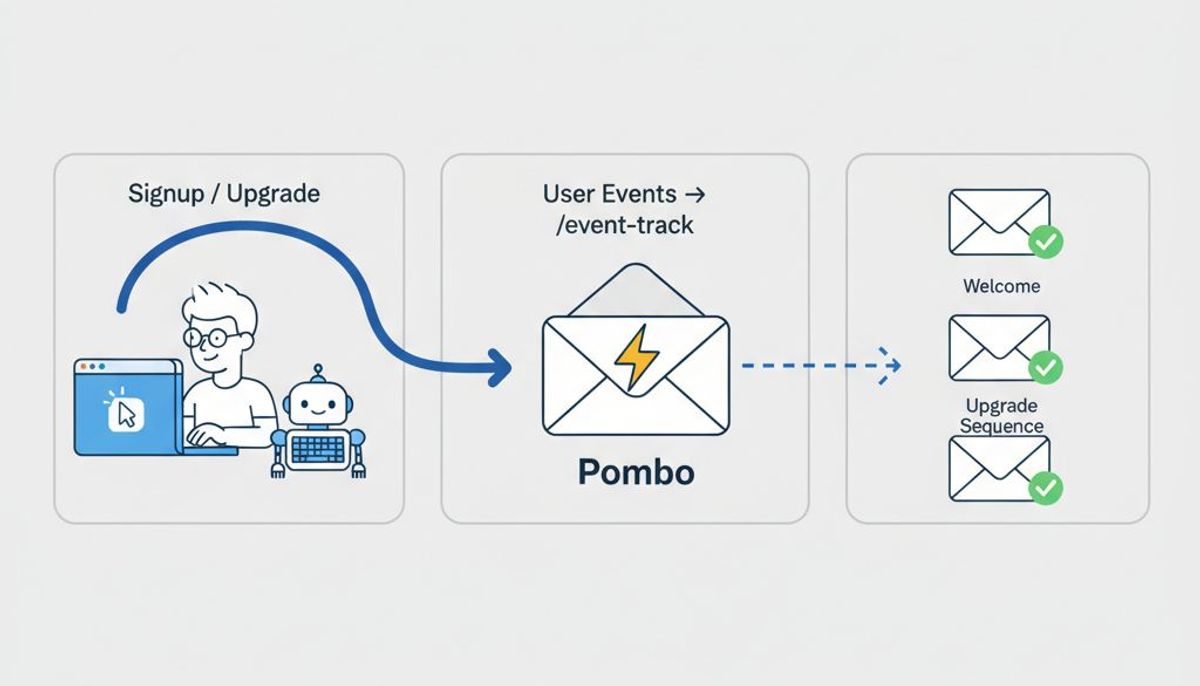
Cursor email marketing closes that gap from inside the editor. You ask Cursor's agent to post the event to Pombo, then to build the templates and the sequence over MCP. You review each step and decide what goes live.
This guide is for a developer who wants that set up today. It takes three steps: connect Pombo to Cursor, find and send your product events, and build one sequence in draft.
Cursor email marketing starts with one MCP server
Cursor reads MCP servers from a JSON file. For this project only, create .cursor/mcp.json in the repository.[1] To have Pombo available in every project, use ~/.cursor/mcp.json in your home directory.[1]
A remote server is an entry with a url field.[1] For Pombo it looks like this:
{
  "mcpServers": {
    "pombo": {
      "url": "https://flypombo.com/mcp/sse"
    }
  }
}
That address is our MCP endpoint.[2] The connection uses OAuth 2.0.[2] The first call opens a browser tab where you sign in to Pombo and approve the connection.[3] There's no API key to paste into the file.[2]
Confirm it works with a read-only question: "How many contacts do we have in Pombo?" If you get a number back, you're connected. Connecting an agent covers scopes and choosing an organization if you belong to more than one.
Two settings are worth a minute before you go further:
- Leave tool approval on. By default Cursor asks before it runs an MCP tool, and the arrow next to the tool name shows the arguments it's about to send.[1]
- Give the agent the playbook. Our Agent Skills are short Markdown files that hand a coding agent the Pombo workflow before it starts.[4] For Cursor, paste the body of the
pombo-eventsskill into your rules file at.cursor/rules.[4] The skills are listed in the Agent Skills docs.
How Cursor finds your product events
Connecting the server gives Cursor our tools. It doesn't tell Pombo what your app does, so ask Cursor to look. Start with a prompt that changes nothing:
Find where our app creates a user and where a plan changes. For each one, tell me the file, the function and the data available at that point. Don't change anything yet.
Read the report. Then have it wire one event:
Create a Pombo API key with only the events:write scope. Read it from an environment variable, never from the repo. In the signup handler, post user.created to Pombo with the user's email and plan.
You can make that key under Settings, API keys, or the agent can make it with the create_api_key tool.[5] Either way, scope it to the one thing your backend calls.[5] The request the agent writes should come out like this:
curl -X POST https://flypombo.com/api/v1/events \
  -H "Authorization: Bearer $POMBO_API_KEY" \
  -H "Content-Type: application/json" \
  -d '{"event": "user.created", "email": "[email protected]", "properties": {"plan": "free"}}'
A 202 means we recorded the event, and an email address we haven't seen creates the contact. Sign up with a test account, then open Settings, Events in Pombo. It lists every event name you've sent, how many arrived in the last seven days, and a live log of individual events. If user.created is there with the right properties, the hard part is done. The payload format is in the events docs.
For more on choosing and naming events, see how to have a coding agent wire your signup and upgrade events.
Cursor email automation: build the sequence in draft
Now the event exists, ask for the email:
In Pombo, build a welcome sequence triggered by user.created. Email 1 goes out immediately and names the one thing to do first. Wait 2 days. Email 2 shows how to do it, with one link. Set the goal to onboarding.completed and stop anyone who reaches it. Use our brand voice. Leave the sequence in draft and send me a preview link for each template.
The agent creates the templates and the sequence through our MCP tools. A sequence can have waits, branches and a goal that ends the journey early once a contact converts. Anything you put in the event's properties is available in the email, so {{ event.plan }} renders the plan the user signed up on. Event-triggered sequences explains how the trigger and the goal work.
The 2 day wait is a starting point. Ask the agent why it chose each delay and each subject line, and change what you don't agree with.
Can Cursor send email?
Some of it. The agent can send you a test, and it can send a transactional email by key, such as a receipt.[6] Sending email from an AI agent over MCP covers that case.
It can't send or schedule a campaign. That stays a click in Pombo, and every send still has to pass our sending gates: an approved account, a permission attestation, a verified sending domain and the weekly cap. A new account can build everything in this guide before it is approved to send.
Review before anything sends
You get three places to say no.
- In Cursor, per tool call. Check the arguments before you approve a call that creates or changes something. The MCP specification says there should be a human in the loop who can deny tool invocations.[7]
- In Pombo, with a simulation. Simulation runs the sequence against your real contacts without sending anything, so you can check the whole flow before it is live.
- At activation. Read every email, then set the sequence active yourself in Pombo.
If you work in Claude Code as well, the Claude Code version of this guide follows the same steps, and email marketing from an AI agent covers the other clients.
Connect your agent
Connect Cursor to Pombo. You add our MCP server by URL, sign in and grant access. We have a free plan, so you can build and simulate the whole sequence before you send anything.
Frequently asked questions
How do I connect an email MCP server to Cursor?
Add an entry with Pombo's MCP address to .cursor/mcp.json in your project, or to ~/.cursor/mcp.json for every project. The first call opens a browser tab where you sign in to Pombo and approve the connection.
How does Cursor find the product events my app sends?
Cursor reads your code. Ask it where users are created and plans change, review its report, then have it post each event to Pombo's events API. Settings, Events in Pombo shows what arrived.
Can Cursor send email through Pombo?
The agent can send you a test and send a transactional email by key. It cannot send or schedule a campaign. That stays a click in Pombo.
Do I need to paste an API key into Cursor?
No. The MCP connection uses OAuth, so you sign in to Pombo in the browser. Your backend needs its own API key with the events:write scope to post events, which the agent can create.
How do I review a sequence before it goes live?
Check each tool call's arguments in Cursor before approving it, run a simulation in Pombo to see who would enroll and what they would receive, then set the sequence active yourself.
Sources
- Model Context Protocol (MCP) | Cursor Docs, Cursor
- Connect an agent | Pombo, flypombo.com
- Run Pombo from an AI agent | Pombo, flypombo.com
- Agent Skills | Pombo, flypombo.com
- REST API reference | Pombo, flypombo.com
- What an agent can do | Pombo, flypombo.com
- Tools - Model Context Protocol, Model Context Protocol (modelcontextprotocol.io)