Claude Code already knows your codebase. It can find your signup handler, read your billing webhooks, and tell you what happens when a trial ends. What it usually cannot do is the email half of that story: create the sequence that greets a new signup, write the three emails in it, and wire the event that starts it. That work sits in a dashboard, so it gets done last, or not at all.
Connect an email platform to Claude Code over MCP and that split goes away. One session can read your code, add the event call where it belongs, and build the sequence that reacts to it, with you reviewing each step. This guide walks through that setup with Pombo: connecting it, teaching Claude Code the workflow, and the four jobs it handles well. It ends with what stays with you.
If you want the general picture of MCP and email first, start with send email from an AI agent with MCP. This post is the Claude Code version, and it goes further into your code.
Why Claude Code, specifically
Most agents that can send email work from a chat window. They can draft a campaign, but they cannot see the product that email is about. Lifecycle email is different from a newsletter: it is triggered by what people do in your app, so half the job lives in your code.
Claude Code works in your repository. That means it can do both halves in one place:
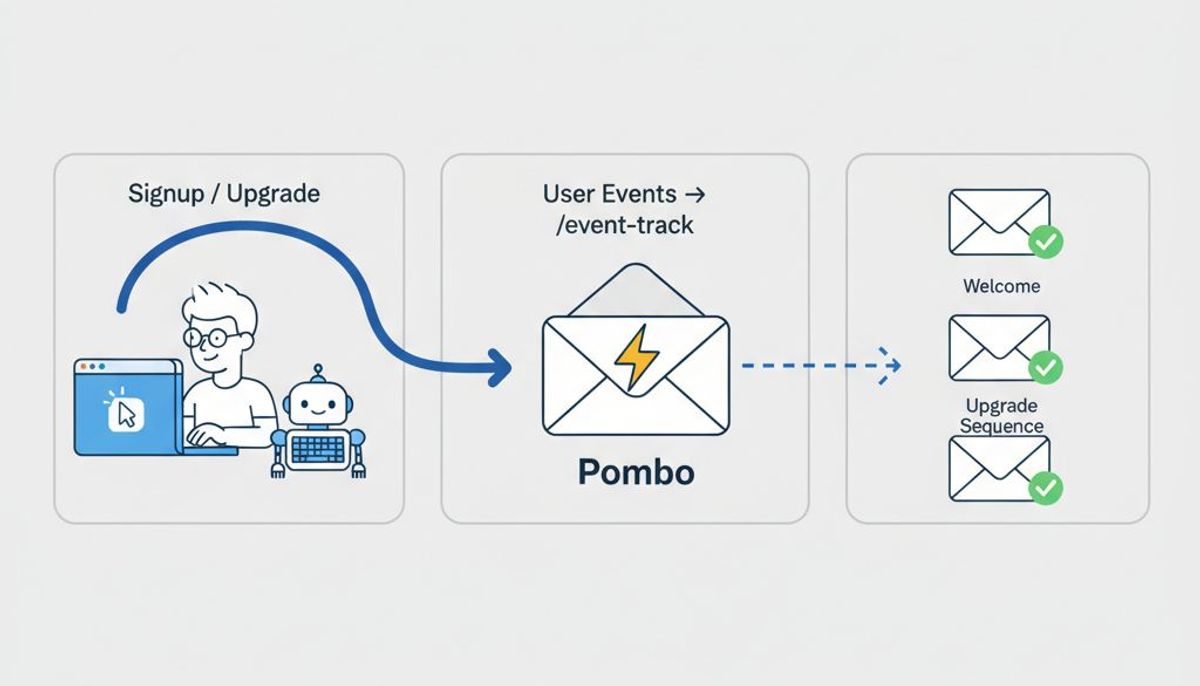
- In your code: find where signups, upgrades and cancellations happen, and add the one line that tells your email platform about each.
- In your email platform: create the sequence that event starts, write the emails in your brand voice, and send you a test.
Doing both in one session is what keeps them in step. The event name the code posts is the event name the sequence listens for, because the same agent wrote both.
Step 1: connect Pombo to Claude Code
Pombo runs a remote MCP server. Add it from your terminal:
claude mcp add --transport sse pombo https://flypombo.com/mcp/sse
Add --scope project to write the server into the repository's .mcp.json, so everyone on your team who opens the project in Claude Code gets the same connection.
There is no API key to paste. Inside Claude Code, run /mcp, pick the Pombo server and sign in: a browser tab opens, you log in to Pombo and approve the connection, and Claude Code holds the token from then on. If you belong to more than one Pombo organization, the details are in connecting an agent.
Confirm the wiring with something that only reads:
How many contacts do we have in Pombo, and what sequences are set up?
If that comes back with real numbers, you are connected.
Step 2: teach it the workflow with Skills
A connected agent can call every tool, but it does not yet know the order things should happen in. It does not know that a sending domain comes before a test send, or that unsubscribes come across before anything is mailed. Agent Skills are small modules that give it that plan up front.
Claude Code reads skills from .claude/skills/ in your repository. Install the one for setup like this, and the rest the same way:
mkdir -p .claude/skills/pombo-setup
curl -sL https://flypombo.com/skills/pombo-setup > .claude/skills/pombo-setup/SKILL.md
There are five: pombo-setup, pombo-migrate, pombo-events, pombo-campaigns and pombo-transactional. The skills page lists them, with a manifest if you want to fetch them all at once. Commit them with the code, and every session starts knowing the playbook.
Step 3: get the account ready to send
Ask Claude Code to set the account up:
Set up Pombo for this app. Our sending domain is mail.example.com.
With the setup skill loaded, it checks what is missing first (get_setup_status), then adds your sending domain (add_sending_domain). Pombo returns the DKIM, SPF and DMARC records, and Claude Code can show you exactly what to add at your DNS provider. Adding them is on you, because your DNS lives outside Pombo. Once they are in, it checks the domain again (check_sending_domain).
Two things here are deliberately not the agent's to do. New accounts are reviewed before they can send, which is a manual step on our side. And every message, whoever starts it, must pass the same sending gates: an approved account, your attestation that you have permission to email these people, a verified domain, and the weekly cap on the free plan.
Step 4: wire your product events
This is the part only a coding agent can do well. Ask it:
Find where users sign up and where they upgrade to a paid plan, and send both to Pombo as events.
Claude Code searches the codebase for the signup and billing paths. It then creates a REST API key scoped to events:write only (create_api_key). The token is shown once, so tell Claude Code to put it straight into your secrets store or environment, never into a committed file. Then it adds the call where each event happens:
POST https://flypombo.com/api/v1/events
Authorization: Bearer pombo_...

{
  "event": "user.signed_up",
  "email": "[email protected]",
  "properties": { "plan": "trial", "signup_source": "pricing_page" }
}
An unknown email creates the contact, so the signup event does double duty. Anything in properties is available in the emails it triggers, as {{ event.plan }} and so on. The events docs cover the rest. If you are deciding which events are worth sending at all, event-triggered email is the place to start.
Review this diff like any other. It is your application code, and it goes through your normal pull request.
Step 5: draft the sequence that event starts
Now the email half:
Build a trial onboarding sequence that starts on user.signed_up: a welcome email straight away, a first-project email two days later, and a trial-ending email three days after that. Write it in our brand voice.
Claude Code reads your brand voice (get_brand_voice), writes the three templates (create_template), then builds the sequence with a custom_event trigger on user.signed_up (create_sequence). The waits are their own steps between the emails, which is how Pombo models a delay. It checks that the whole flow would run (validate_sequence) and sends you a test of the first email (send_test_email). A test is a real send, so it passes the same gates: if your account is still waiting for approval, the test waits too.
The sequence is created as a draft. Open it in Pombo, read the emails, change what you would change, or ask Claude Code to revise them in the same session. Building a sequence covers the editor if you want to adjust it by hand.
What a session looks like
Here is the shape of that last step. The tool names are the real ones; the wording is illustrative.
> Build a trial onboarding sequence that starts on user.signed_up ...

  get_brand_voice      friendly, direct, no jargon
  create_template      "Welcome"        subject: Welcome aboard, here is day one
  create_template      "First project"  subject: Your first project in five minutes
  create_template      "Trial ending"   subject: Two days left on your trial
  create_sequence      "Trial onboarding" (draft), trigger: user.signed_up
                       email, wait 2 days, email, wait 3 days, email
  validate_sequence    no issues
  send_test_email      Welcome, sent to you

Saved as a draft in Pombo. Nothing is live until you turn it on.
Claude Code asks your permission before it calls a tool, unless you have told it not to, so you see each of those steps before it happens.
What stays with you
Handing an agent write access to your email is reasonable because of where the stops are:
- Campaigns never go out from the agent. It can draft a one-off campaign, pick its audience and send you a test. Sending it, or scheduling it, is a click in Pombo.
- A sequence goes live only when you say so. Claude Code builds sequences as drafts. It can switch one on, but only if you ask it to, and Pombo checks the whole flow is valid first. Most people review the draft in Pombo and switch it on there.
- The sending gates apply to everything. An agent cannot get around account approval, the permission attestation, domain verification or the weekly cap.
- Every call is logged on your account. The connection acts as you, and you can see what it did and when.
- Your code changes are ordinary diffs. The event wiring lands in a pull request you review, like anything else Claude Code writes.
What stays with you is what should: whether the emails are right, when they go live, and what you merge.
When to reach for something else
Claude Code is the right tool when the work spans your code and your email platform. For a one-off announcement with no code involved, Claude or ChatGPT with Pombo connected is quicker. For email your backend sends without anyone present, such as receipts and password resets, the runtime path is the REST API from your own code, not an agent. The agent's job is to set that up once, not to be in the loop every time.
Try it
Pombo has a free plan with no time limit. Add the server, install the skills, and ask Claude Code to set up your account. The full list of what it can reach is in what an agent can do.