A new customer signs up on a Tuesday afternoon, and nothing happens. No welcome, no follow-up, no nudge when they stop using the product a week later. If you run a small team, you may know that gap is there and still not have got to it, because nobody owns lifecycle email full time.
That is the job AI agent email marketing is good at. You connect the AI agent you already use, such as Claude or Cursor, to your email platform, and the agent does the setup work: it inspects your contacts, builds a segment, drafts the emails and configures the sequence. You stay in charge of who gets emailed and what the business says. For a sense of where agents are heading more broadly, Gartner forecasts that by 2028 agentic AI will make at least 15% of day-to-day work decisions on its own, up from none in 2024.[1]
This guide is for founders and developers who want to hand that work to an agent. It covers what an agent can do in Pombo, what stays with you, and how to set it up. The guides linked at the end go deeper on each part.
How AI agent email marketing works in Pombo
Everything you can do in the Pombo interface can also be done by an AI agent over MCP: contacts, segments, templates, sequences, brand voice, images, analytics and setup. What an agent can do in Pombo lists the tools by area.
The building blocks are the ones a lifecycle program needs: event triggers, dynamic audience segments, multi-step sequences with waits and branches, and per-step goals that end a journey early once someone converts. An agent can create and edit all of them, and you can take over in the interface at any point.
This is different from asking a chatbot for three emails and pasting them into another tool. The agent works inside your Pombo account on the setup itself, while sending and scheduling stay actions you take.
An example: a welcome sequence built with an agent
Say you want to welcome new contacts after they sign up: a first email that confirms what happens next, then a useful follow-up a few days later. You might ask the agent:
Build a two-email welcome sequence for new signups. Trigger it on
user.signed_up, wait three days before the second email, and stop it for anyone who sendsplan.upgraded. Use our brand voice and leave it in draft.
Here is how the work divides.
- Trigger. Your product sends a signup event to Pombo, and the sequence reacts to it. A broadcast, by contrast, goes to an audience you choose for that one send. Event-triggered email explains the difference.
- Content. The agent drafts both emails in your brand voice, using the product details you have recorded.
- Timing and goal. It adds the three-day wait and a goal on the upgrade event, so someone who has already upgraded stops getting the follow-up.
- Check. It validates the flow and leaves the sequence in draft. Run it in simulation mode to see how it would play out before it goes live.
For a fuller set of emails and timings, see the welcome email sequence. If the trigger is wrong, polished copy won't fix it, so check the event, the audience and the wait before anything goes live.
What to ask the agent first
Start with requests that are small and easy to check:
- "Show me contacts who signed up in the last 30 days and haven't done anything since." This is a read, so nothing changes. You see who the agent thinks the audience is before it builds on top of it.
- "Draft a two-email welcome sequence for new signups, and leave it in draft." You get a sequence you can open, edit and simulate. Nothing is sent.
- "Read last month's sends and tell me which template performed worst." The agent reads your analytics and points you at the template to fix first.
None of them asks the agent to send. That is on purpose.
What stays with you, and what Pombo enforces
An agent cannot send or schedule a campaign in Pombo. That stays a click you make, with the audience, sender, subject and content in front of you. A draft is as far as an agent goes on its own.
Pombo also checks four things before any message leaves, whoever asked for it:
- the organization is approved for sending
- it has attested that it only emails people who gave permission
- it has a verified sending domain
- it is under its weekly cap
New accounts start on a waitlist. They can build sequences, import contacts and design templates, but cannot send until the account is approved. Sending gates has the detail.
Unsubscribes and suppression are always honoured, and an agent cannot work around them: see suppression. The decisions that stay with a person are the goal, who is in the audience, and the claims the business is willing to make. An agent can draft a welcome email. It can't decide your refund policy or promise a feature you haven't shipped.
How to set it up
Start small. Don't begin by granting broad access and asking an agent to "run email marketing."
- Connect the agent. Add Pombo as a remote MCP server at
https://flypombo.com/mcp/sse, then sign in to Pombo and grant access. There is no API key to paste. Connecting an agent has the steps for each client. - Send your product events. Decide which customer actions should start a sequence, such as a signup, and have your backend send them to Pombo's events API. The events docs show the request.
- Start with read and draft work. Ask the agent to inspect a segment, then to draft one sequence. Review what it proposes.
- Test it. Run the sequence in simulation and send yourself a test email.
- Send it yourself. When you're happy, make the live send or start the sequence. That click stays with you.
If you use Claude, Pombo's Agent Skills give it the setup, events and campaign playbooks up front, so it spends less time guessing.
Transactional and marketing email in one place
Because transactional and marketing email run on the same platform, the agent that builds your welcome sequence can also help with the receipt or password-reset template, sent by API key or from a template. Transactional vs marketing email explains why the two are treated differently.
Guides in this section
Each of these goes deeper on one part of running email from an agent:
- How to run your product's email marketing from Claude Code: a full session in Claude Code, from connecting Pombo to a drafted sequence.
- Send email from an AI agent with MCP: how the MCP connection works, the safety model, and when to use the REST API instead.
- Have a coding agent wire your signup and upgrade events: getting your product's events into Pombo with a coding agent's help.
Connect your agent and start with one sequence
Pick one lifecycle gap you already know about, most likely the welcome email that was never written. Connect your agent, ask it to build that one sequence, and review it in simulation. When it looks right, you send it.
Connect your agent to Pombo and start with one sequence.
Frequently asked questions
What is AI agent email marketing?
It means using an AI agent connected to your email platform to inspect contacts, build segments, draft messages and configure sequences. A person stays responsible for the audience, the claims and every live send.
What can an AI agent do in Pombo?
Over MCP an agent can work with contacts, segments, templates, sequences, brand voice, images and analytics, and set up your account. It cannot send or schedule a campaign. That stays a click in Pombo.
Is it safe to let an AI agent send marketing emails?
In Pombo the agent does not send. Sending stays with you, and every message still has to pass four gates: sending approval, a permission attestation, a verified domain and a weekly cap. Unsubscribes and suppression are always honoured.
Can I use Claude, Cursor or ChatGPT for email marketing?
Yes. Connect the agent following the connecting-an-agent guide, then start with a small task such as inspecting a segment or drafting one sequence in draft, and review it in simulation before anything goes live.
Sources
 October 20, 2026Set Up Your Product's Email From Cursor: Events, Sequences and TemplatesA how-to for developers: add Pombo to Cursor as an MCP server, have the agent find and send your product events, and build a welcome sequence in draft. You review it and decide what goes live.
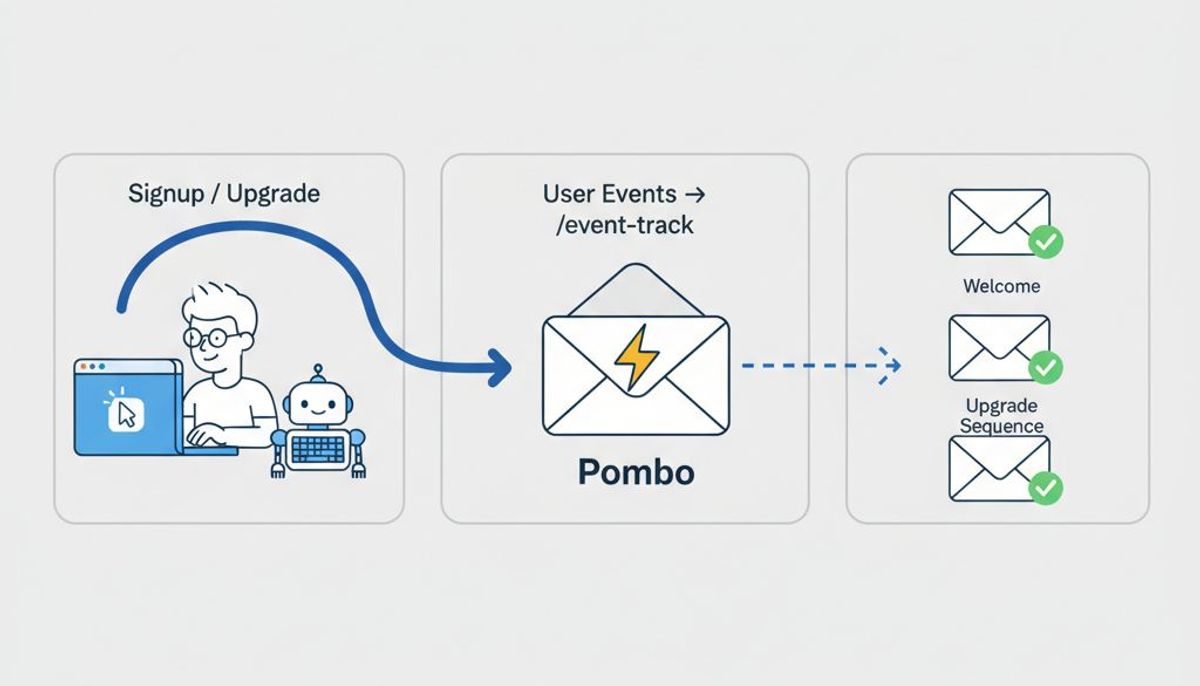 October 6, 2026Have a Coding Agent Wire Your Signup and Upgrade Events for EmailA coding agent can find where signup and upgrade happen in your app, then help instrument those events for lifecycle email. Here’s how to review the event plan, shape the data, and test the resulting Pombo sequence before it goes live.
 September 29, 2026How to run your product's email marketing from Claude CodeConnect Pombo to Claude Code and let it do the lifecycle work that spans your codebase and your email tool, from wiring the signup event to drafting the sequence it starts.
 September 3, 2026Send email from an AI agent with MCPHow to let Claude or another MCP client draft and send your product email, what the safety model looks like, and when to reach for the REST API instead.
Hand your email to your agent.
Connect Claude, Cursor or ChatGPT to Pombo and it sets up sending, brings your list across and drafts every email in your voice. Nothing sends until you approve it.